Search This Blog

Showing posts with label Projects Schedules. Show all posts

Tuesday, October 11, 2011

12 Integrating Modern Methods for Faster Systems Engineering

12.0 Introduction
In chapter 2 it was explained that the best model for system development is the “craftsman” model that was widely used before systems became so complex that a single chief engineer could no longer understand a system in sufficient detail to control all aspects of design. System engineers, design engineers and other specialty engineers became necessary to handle the complexity of modern systems. Although this new approach has enabled the development of very complex modern systems it takes much longer to develop a system now than it used to take when a chief engineer and his/her team could develop a new system in a few months.
One objective of this book is to introduce new methods that enable the systems engineering work on system development to be accomplished faster and more accurately. This book has an emphasis on systems engineering fundamentals, as described in the DoD SEF and the NASA SE handbook, and readers will note that it takes time and discipline to follow these fundamental processes. Complex systems cannot be developed cost effectively by shortcutting the systems engineering fundamentals; what is necessary is faster and more accurate methods for executing these fundamentals. Accuracy is required because any errors in systems documentation results in costly “find and fix” efforts later in design or in integration and test. Several methodologies for ensuring accuracy have been discussed including using graphical models in place of text as much as possible, employing redundant tools for developing documentation, using modeling and simulation to support requirements analysis as well as design and checking work at the three levels of worker checking his/her work, peer reviews and design reviews.
In chapter 5 pattern based systems engineering was introduced, which when properly implemented, can dramatically reduce the time to produce much of the top level systems engineering documentation and at the same time increase the accuracy of requirements definition. Similarly using validated system performance models and simulations throughout the development cycle aids in reducing development time and increases the accuracy of requirements and design concepts and the robustness of systems.
The objective of this chapter is to describe methods for reducing information latency and then to show how integrating modern methods can achieve greatly reduced time for systems engineering work without sacrificing any process fundamentals critical to the accuracy of this work. Information latency is the time between when information is generated and the time it is available to others who are depending on the information for the next steps in their work. Information latency was increased with the evolution from the craftsman model for product development to models with systems engineers; this is the primary reason modern systems take so long in development. Reducing information latency to levels near what it was for the craftsman model is a necessary step in achieving faster system development cycles.
12.1 Integrated Concurrent Engineering
In the 1990s a method emerged for reducing information latency for system development teams. This method is similar to methods used previously when teams of workers were brought together in a common work area to collaborate to quickly accomplish some project. Many organizations in the aerospace and defense industry use special work areas to collocate the people writing and publishing proposals, which are often highly time constrained projects. The use of proposal preparation rooms with personal dedicated to working in these rooms results in highly productive teams for the limited times involved in typical proposal efforts. A major part of the increased productivity is due to the reduction in information latency achieved by having workers so close they can ask questions of one another and get immediate answers. If teams tried to maintain such intense work over long periods productivity would taper off due to workers being unable to maintain the long hours and intense work without burnout.
The methods that evolved in the 1990s achieve the reduction in information latency and the associated productivity gains of the colocated teams and permit teams to work effectively for long periods without burnout. These methods became possible by exploiting new technology as well as new work management methods.
The availability of inexpensive large screen display projectors, n to one video switches and inter/intra nets makes it cost effective to set up special work rooms where teams of 10 to 25 knowledge workers can gather with their laptops and software tools. These teams can simultaneously work and share the work results with the entire team on the large screen displays as fast as the results are available. Many organizations now use such facilities for teams to gather for intense work and information sharing periods of three to four hours two or three times weekly. These sessions must be well planned and workers must come prepared to work and share results in real time. Planning, documenting work and time consuming tasks are performed in between the sessions in the special work rooms. This approach is called by a number of names but Integrated Concurrent Engineering (ICE) is a common name. This approach is effective because it reduces information latency from minutes to seconds or hours to minutes.
ICE is proven to reduce cost and schedule of complex projects by factors of three to ten 12-1, 12-2. Neff & Presley 12-3 reported that the Jet Propulsion Laboratory initially achieved an average of over 80% reduction in project costs and significantly improved the quality and speed of work. With more experience a 92% reduction in design time and a 66% reduction in cost was reported. Designs produced using ICE are of higher quality because they examine each option in greater detail earlier in the design process by sharing thousands of design variables in real time. Approaches that are proven to reduce cost and schedule by factors of three to ten and increase quality at the same time should not be dismissed by organizations that wish to remain competitive.
The benefits of ICE are better understood by examining the work space and the work process in more detail. There is no single best work space design or work process; each organization tailors both to their views and their business processes. Examples presented here are guidelines for understanding ICE and not necessarily the best for any specific organization.
12.1.1 The ICE Design Command Center- A schematic diagram of a small ICE work area is shown in Figure 12-1. The room has large screen displays located where they are visible to everyone in the room. Several displays are used so that several different types of information can be displayed simultaneously. Each skill cluster has workers with common specialties and each worker has computer equipment and the design, modeling and simulation tools associated with his/her specialty. Alternatively each cluster can be an IPT responsible for a segment of the system design. Each of the computers is connected to one of the large screen displays via a video switch so that the results of analysis, modeling or simulation can be shared with everyone in the room on one of the large screen displays. The facilitator, typically the lead systems engineer for the systems engineering phase of development, is responsible for maintaining the design baseline visible to all at all times and to lead the team through a preplanned sequence of analysis tasks that lead to design decisions in real time.

 Figure 12-1 A diagram of a small ICE work are showing six specialty skill clusters, five large screen displays and a facilitator/leader.
 Many developments take place in multiple locations and it isn't practical to bring teams from different locations together in a common work area for each ICE session. Modern technology enables teams working is several separately located ICE facilities to communicate with each other and to see each other’s work in real time; thereby achieving the benefits of ICE even though the teams are in different locations. Technology allows virtual collocation. Using ICE with a team that is fractionated into multiple locations and even diverse cultures has the benefit of facilitating the interactions necessary to the success of any system development.
12.1.2 The ICE Concept of Operations - Integrated Concurrent Engineering is a repeating series of planning sessions followed by team work sessions, followed by documentation and follow-up analysis in parallel with the planning for the next series of team work sessions. The times for each of the components of the ICE cycle are dependent on the type and complexity of the system being developed. Example times are given here to explain the concept of operations. Development teams are likely to find adopting this concept of operations to their systems development requires adjustments. A typical approach is illustrated in Figure 12-2 where a series of three plan/ meet/document sessions are shown and each of the meet or design sessions is comprised of three intense team sessions separated by a day or two. Individual design sessions may last from two to four hours.
 Figure 12-2 An example ICE concept of operations where A is planning, B is series of team work sessions and C is documentation and analysis.
The planning, indicated by A in Figure 12-2, is done by team leaders and might take a week to plan a series of three intense work sessions, indicated by B, over another week period. The series of work sessions is followed by perhaps two weeks of documenting work done in the design sessions and carrying out analyses that takes too much time to be done in design sessions. In the example shown in figure 12-2 nine intense design sessions are planned, executed and documented in a an eight week period. Note that since the design sessions are the only activities that require the ICE design command center such a center can support three or four ICE projects or separate IPTs of a large project concurrently.
12-1 The Integrated Concurrent Enterprise by David B. Stagney, MIT Department of Aeronautics and Astronautics, Sloan School of Management, August 13, 2003

12-2 Observation, Theory, and Simulation of Integrated Concurrent Engineering by John Chachere, John Kunz, and Raymond Levitt, Center For Integrated Facility Engineering, Working Paper #WP087, Stanford University, August 2004

12-3 Implementing a Collaborative Conceptual Design System
– The Human Element is the Most Powerful Part of the System by Jon Neff and Stephen P Presley, IEEE, 2000.

Tuesday, October 5, 2010

Processes and Tools for Planning a Program - 3

Defining Tasks and Developing Schedules
Defining and Sequencing Tasks – The NASA Systems Engineering Handbook discusses in section 4.4 the use of work flow diagrams (WFD) for developing schedules. The WFD is a graphical representation of tasks, task precedencies or dependencies and “products or milestones” that occur as a result of one or more tasks. Using the WFD as defined can lead to scheduling problems due to not fully defining each task. It’s possible to expand the definition of the WFD so that tasks are fully defined. However, there is a simple tool for more completely defining and sequencing tasks that can be used in conjunction with or independently of the WFD before any schedule below the top level is developed.
A simple and effective tool for defining and sequencing detailed tasks is the N-Squared diagram.  N-Squared diagrams are traditionally used in defining software and hardware interfaces but are just as valuable for defining interfaces between tasks. N-Squared diagrams are constructed for tasks and subtasks as a nested set using spreadsheet tools. Tasks are listed in squares along the diagonal set of squares in an N x N matrix of squares. In addition to putting the task name in a diagonal square other information useful to the project team can be added; e.g. the Work Breakdown Structure (WBS) number of the task, or perhaps the task leader’s name, or a paragraph number in a proposal or task description document that describes the task.
N-Squared diagrams can be developed top down or bottoms up or using a mix of bottoms up and top down. Here it is described as a top down process but don’t be constrained by this description. Start with a list of N tasks of the same level in the order you think they need to be executed. Top level tasks often have multiple levels of subtasks. List each top level task in turn in one of the squares along the diagonal of the N x N matrix.  The N-Squared diagrams for the subtasks of each task are constructed as separate diagrams.
The next step is to write the external inputs to the tasks in the row above the diagram and above the square containing the task that the external inputs feed into. Then write the outputs of the first task in squares that are to the right of the first square in the first row of squares. Each output is to be in the square directly above the diagonal square containing the task that requires the output from the first task as an input.  Then continue this process for each diagonal square. Outputs that feed tasks in diagonal squares that are above the row go in boxes to the left of the diagonal square and outputs that feed tasks in diagonal squares that are below the row go in boxes to the right of the diagonal square. This process defines the tasks in that the inputs and outputs of each task are identified along with the sources of the inputs and the tasks that need the outputs.
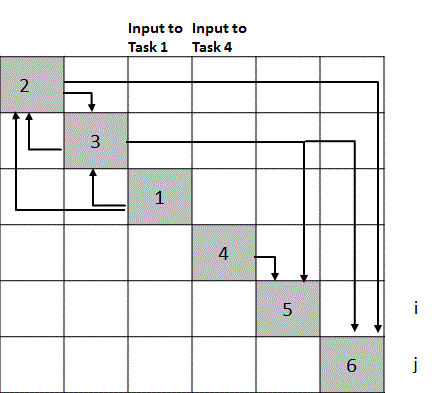
After completing this listing of outputs for each diagonal square examine the form of the resulting N x N matrix. A simple example with six tasks, one external input to task 1 and two outputs from tasks five and six is shown in Figure 4-1. In this figure the tasks are labeled with numbers along the diagonal and the outputs from tasks are labels with letters. Arrows can be added to make it clear which task each output feeds, as shown in Figure 4-1.


Figure 4-1 An N-Square diagram is a useful tool for defining tasks and the relationships between tasks.
An ideal sequence of tasks for a perfectly sequential project has outputs only to the right side of the diagonal. Typical projects have some tasks with outputs on the left of the diagonal squares. These outputs represent feedbacks to earlier tasks. Typically in executing the tasks in the diagonal squares that have feedbacks from tasks in squares in lower level squares assumptions or estimates are made for the inputs needed from lower level tasks and the tasks are reviewed or repeated after the lower level tasks are completed. Thus the form of the N x N diagram defines how efficiently the tasks are ordered. If there are a lot of outputs on the left side of the diagonal it is necessary to see if reordering the tasks results in moving more outputs to the right of the diagonal and thereby reducing the number of feedback loops that must be executed. Executing feedback loops increases the time and cost for completing the work. Therefore sequencing the tasks for a minimum number of feedback loops usually means achieving a task sequence that leads to the least rework, the shortest schedule and the lowest cost.
Often it is easy to get the top level summery tasks in the most efficient order even without using an N x N diagram. The value of this tool comes in sequencing lower level tasks. Once the top level tasks are sequenced then prepare N-Squared diagrams for each of the top level tasks. For example, suppose one of the top level tasks is System Trade Studies. Complex systems can have a dozen to several dozen system trades that are highly interrelated. It takes only a few hours to define the best order for the trades using an N-Squared diagram. Having just one or two tasks out of order can increase the time for completing all trades by days or even weeks.
Figure 4-2 illustrates an N-Squared diagram for the tasks defined in Figure 4-1 with task 1 sequenced to follow tasks 2 and 3. In this figure only arrows are used to indicate outputs from tasks and where the outputs are needed to make it easier to see the effects of sequencing errors. The sequence in Figure 4-2 is obviously less desirable than that of Figure 4-1 because there are multiple feedbacks, which increases the time needed to execute these six tasks compared to the time for the sequence shown in Figure 4-1.

Figure 4-2 This sequence has three outputs to the left of the diagonal compared to one for the sequence shown in Figure 4-1 and therefore takes more time to execute all six tasks.
There is a second payoff from constructing an N-Squared diagram. The form of the diagram not only defines the most efficient sequence for tasks it also shows which tasks can be conducted in parallel.  For example, note that task four has externally available input data and requires no data from any of the first three tasks. Thus the fourth task can be started in parallel with the first task, or at any time such that its output is available at the start of task five. Obviously tasks can be started as soon as the necessary inputs from earlier tasks are available and staff is available to execute the task. For example, in Figure 4-1 if there was no output from task 3 feeding to task 6 then task 6 could be executed any time after task 2 and the repeat of task 2 with data from task 3 is complete. The form of the N-Square diagram reveals immediately all tasks that can be started in parallel. Starting tasks in parallel increases the flexibility in staffing. Achieving maximum schedule flexibility, i.e. maximum lead and lag times for tasks, should be one of the goals of scheduling tasks.
To avoid the rework resulting from too much detailed task planning and scheduling in the initial project planning effort prepare second and third level N-Squared diagrams for only those top level tasks that are likely to be executed in the first two to four months of the project. Second and third level diagrams for summary tasks that are to be executed later should be developed with sufficient lead time before these tasks are to begin to allow for planning the staffing of the upcoming tasks.
Finally, N-Squared diagrams are often a very useful visual aid to communicate to customers and managers the scope and status of project work. A skilled project manager on a satellite program posted a project N-Squared diagram where it could be easily reviewed by customers and team members. He colored tasks to show task completions so that status was communicated at a glance. This gave the customers increased confidence in the project team and project management compared to just seeing schedule charts.
Developing the Schedule – This discussion assumes that those responsible for developing the schedule are familiar with both the principles of network scheduling, such as Program Evaluation and Review Technique (PERT) or Critical Path Method (CPM), and are skilled in using modern scheduling software tools. This material is not intended to teach scheduling but systems engineers need to be aware of some pitfalls in scheduling complex projects. A recommendation for the inexperienced scheduler is to study a text book on scheduling projects. James B. Dilworth’s “Production and Operations Management” contains an excellent discussion of scheduling.  Particularly important is Dilworth’s discussion of PERT using probabilistic time estimates. An alternative view of probabilistic schedules is found on the web in a blog post by Glen B. Alleman and should be studied by anyone involved in scheduling complex projects. Finally read Eliyahu M. Goldratt’s book “Critical Chain” or search “Critical Chain” on the web and read about Critical Chain Project Management (CCPM). The NASA Systems Engineering Handbook has a description of a process to develop a network schedule after finishing work flow diagrams or N-Squared diagrams. This description isn’t repeated here but a couple of comments are needed.
First, the NASA process calls for a bottom up approach; lower level tasks for subsystems or other work products are scheduled and then these groups of tasks are integrated in the scheduling tool to form the complete detail schedule. This can lead to difficulties and a lot of rework. The rework process is described in the NASA Handbook but much of the rework can be avoided by developing the detail schedule top down.
Typically projects have schedule constraints and developing the schedule bottom up leaves to the end the work of making the complete schedule comply with the constraints where it becomes complex and error prone. It is recommended that when a project has schedule constraints or when the project team wants to meet fixed dates for major milestones and deliveries then include these constraint dates on the Master schedule. Then develop the detail schedule top down from the Master schedule. Scheduling tools can combine these two schedules into what truly can be called an integrated master schedule (IMS).
The top down approach works best if the persons developing the schedule meet with those knowledgeable of the work needed at lower levels and work out the details necessary to comply with the constraints. This is time consuming but actually takes less time than it does to fix a complete schedule that doesn’t meet constraints. Plus, the bottom up approach nearly always results in having to go back to those responsible for the lower level tasks and rework the task details. This is aggravating to workers and managers.
Second, the NASA process does not discuss the variability of task durations and probabilistic scheduling that accounts for this variability. Probabilistic scheduling is most important for accurately determining the critical path. Probabilistic scheduling is discussed in a later section on critical path analysis.

Tuesday, September 28, 2010

Processes and Tools for Planning a Program - 2

Project Schedules - There are two types of schedules defined in IEEE 1220 and DoD nomenclature. One schedule is called the Master Schedule in IEEE 1220 nomenclature and the Systems Engineering Master Schedule (SEMS) or Integrated Master Schedule (IMS) in DoD nomenclature.  It is an event driven schedule and is not an executable schedule; it is used by the program management for communicating status and to guide the development of detailed executable schedules. The Master Schedule maps to the WBS, identifies major milestones and deliverables.
The second type is executable, tied to calendar dates and is called the calendar schedule. The calendar schedule is also called the detail schedule or systems engineering detail schedule (SEDS). This schedule is used to develop earned value metrics for government contracts. The NASA Systems Engineering Handbook refers only to one schedule; called the network schedule, which is the same as the detail or calendar schedule. The NASA Systems Engineering Handbook provides instructions for planning and developing the schedule whereas the DoD and IEEE 1220 documents for systems engineering only discuss the planning that systems engineers must do to enable schedules to be developed.
Three schedules are necessary to achieving effective project control and communication with management and customers. First there is the Master schedule as defined by IEEE and DoD. Some slight modifications to the DoD definition are desirable. First, limit the Master schedule to about two levels for most projects. The Master schedule can then include the major phases of the planned work, the management reviews that typically gate the initiation of the next phase and the deliverables, including any long lead items that are on the critical path, and other selected items that drive the schedule. This usually permits a Master schedule to be displayed on a single page, which greatly simplifies communications with senior management.
Second tie the events to calendar dates since most customers for new product developments specify delivery dates. The reality is that product development teams typically must plan a project that meets some schedule constraints. Customers may claim they want an event driven rather than calendar driven program but it’s rare that they actually do. Also the team has less incentive to develop work arounds to hold schedule and cost if the project is truly managed as event driven. These constraints are clear to everyone if they are included in the Master schedule. Finally, use the term Master Schedule and not the terms Integrated Master Schedule (IMS) or SEMS or SEDS. The detail schedule, or network schedule as NASA calls it, is the integrated schedule and both the Master schedule and the detail schedule apply to more than the systems engineering work.
The second schedule is the detail schedule; it is an executable schedule that is calendar driven and is used by the project management, task leaders and workers. It contains all task levels and should have measureable milestones about every one to two weeks to facilitate tracking progress. It is resource loaded, should identify critical resources and allow for contingencies, i.e. lead and lag times (float in NASA nomenclature) should be maximized as much as schedule constraints allow and the critical path should be identified.
The third schedule is a weekly task schedule prepared by each worker and used by the worker to schedule his/her work in order to meet the milestones on the detail schedule. The schedule can be on a 3 x 5 card or any other tool that the worker finds effective. This schedule must be more than a list of tasks. Workers should schedule their time hourly for an entire week at a time and with contingencies to account for the unexpected interruptions that will happen. Many experienced engineers do this automatically but young or inexperienced engineers may need mentoring before they develop the habit of scheduling by the week.
The detail schedule is a critical document to get right because it is the primary tool used to assign budgets and workers to the project and to track the work compared to planned schedule and budget. Both the Master schedule and the detail schedule must map to the Work Breakdown Structure (WBS) that assigns tracking codes to each task for the financial management system in use. The WBS should be based on the hierarchical structure of the product and processes, i.e. the Product Breakdown Structure (PBS) in NASA nomenclature, or System Breakdown Structure (SBS) in IEEE 1220 nomenclature, so that it is tied as much as possible to physical products rather than functions. Readers are referred to section 4.3 of the NASA Systems Engineering Handbook (down load from http://nen.nasa.gov/nasa_nas/ops/systems_community/NASA_SP-2007-6105_Rev_1_Final_31Dec2007.pdf) for a discussion of how to structure the PBS and WBS.
The detail schedule must have all the links and precedent relationships between tasks identified. Fortunately there are software tools, like MicroSoft Project, that facilitate preparing a detail schedule. Such tools are sophisticated and considerable experience is needed to utilize them properly. This often results in persons with skills in the scheduling tool being assigned to prepare or assist in the preparation of the schedules, which can lead to problems, as described next.
 A big mistake inexperienced project leaders make is scheduling the project before the tasks are defined. It’s ok to develop the Master schedule before defining and structuring lower level tasks that belong in the detail schedule because often Master schedules contain project constraints that must be accommodated. Inexperienced project leaders sometimes try to combine two planning steps by listing the tasks to be performed and working out a detail schedule for the list or even developing the task list on the fly using the scheduling tool. Defining tasks should be done first, at least for complex projects, because it’s not obvious how tasks should be sequenced and structured until tasks are fully defined. Defining tasks means defining the inputs, the tasks that are the sources of the inputs, the outputs and the tasks the outputs support. Defining tasks is work that requires analysis by systems engineers, design engineers and operations personnel. Just having a list of tasks does not mean that the inputs, outputs and the work needed to turn inputs into outputs are understood. It should be obvious that schedules constructed without such understanding are not likely to be executable without numerous corrections.
Another big mistake inexperienced project leaders often make is requiring detailed schedules for entire projects as part of the beginning planning. This is a mistake because there is insufficient information to construct such detailed schedules so that a detailed schedule becomes useless within a month or two and re-planning is required.  A rolling wave scheduling process that avoids this needless rework is described after discussing tools for defining tasks.